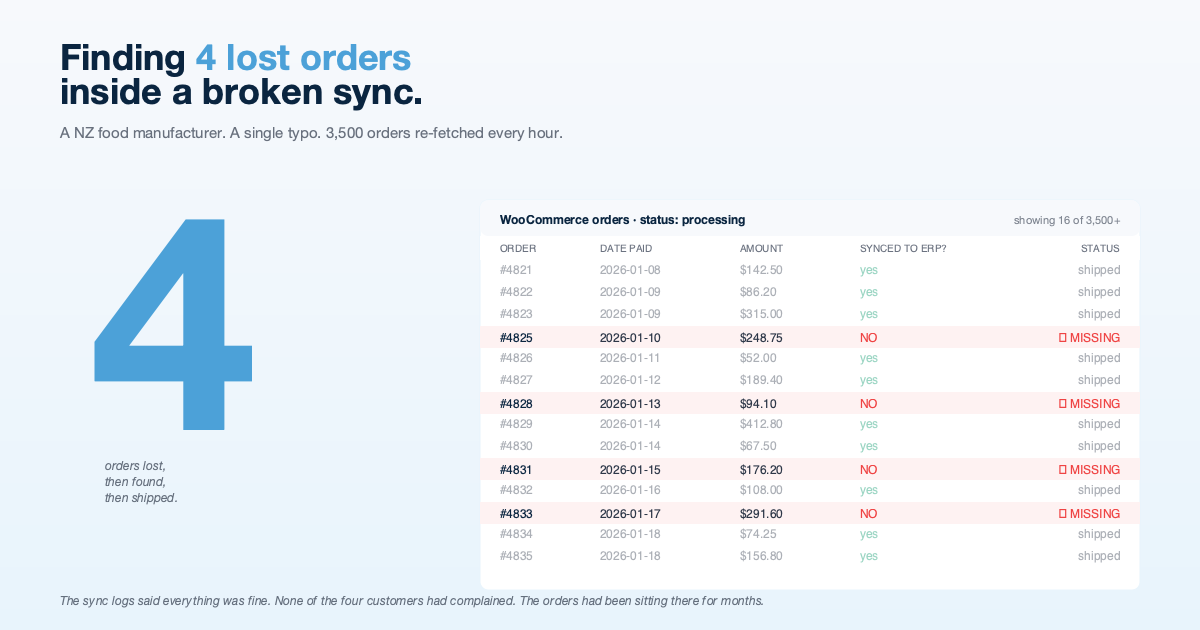
Finding 4 Lost Orders Inside a Broken WooCommerce Sync
A NZ food manufacturer's WooCommerce orders had been silently failing to reach their ERP for months. 3,500 orders were being re-fetched every hour. Four real, paid orders had never shipped. We traced it to a single typo and rebuilt the sync so the same kind of silent failure cannot happen again.
Background
A New Zealand food manufacturer runs an online store on WooCommerce and their accounting, inventory, and production in NexWave, an ERP platform we maintain for NZ and AU businesses. Orders flow from the website into the ERP on a scheduled, background sync. When it works, the supply chain team sees new orders, picks them, and ships them. When it does not work, orders quietly fail to arrive, and the staff only realise when a customer rings asking where their parcel is.
In early 2026 the customer raised a support ticket. They believed some orders were not making it into the ERP. Nothing was obviously broken. The sync was running. There were no errors in the logs. But based on a handful of customer complaints over a period of months, they had a feeling that something was off.
The Challenge
The suspicion was vague. The sync was running every hour. Logs showed it processing orders. No errors anywhere. A straightforward review would have said: “it’s working, the customer is mistaken.”
The work broke down into three parts:
- Identify the actual failure. Is the sync broken? Partly broken? Correctly rejecting orders that should be rejected? Without a reproducible case, we had to treat this as a forensic exercise, not a bug report.
- Find any missing orders. If the sync was quietly losing orders, how many, which ones, and since when? This meant reconciling two systems with different shapes and different views of “an order.”
- Fix the underlying issue so silent failure becomes impossible. Not just patch the symptom. Change the design so the same class of problem in the future produces an alert, not a phantom.
The Root Cause: A Setting That Did Not Exist
The sync tracked a single timestamp: the date of the last successful run. Every hour it would read that timestamp, fetch any WooCommerce orders changed since then, process them, and update the timestamp to the current time. That is the standard pattern for keeping two systems in step.
The bug was in one line. The sync was trying to save the “last successful run” timestamp into a settings record that did not exist on the system. Someone, long ago, had mistyped the name. The underlying framework, unfortunately, tolerated writing to a non-existent setting without raising an error. The save was silently failing, the timestamp never advanced, and nobody noticed.
Every hour, the sync would read the original “last successful run” date (the day the integration was first turned on, back in September 2025), pull every order created or changed since then (3,500+ orders), try to process all of them, and time out before getting through the list. Then it would run again. And again. And again. For months.
Because of the timeout, different subsets of orders got processed on different runs. Most orders made it through on one run or another. A few unlucky ones did not. Specifically: four orders from customers whose first payment attempt had been declined (a Stripe card decline), who came back later and paid successfully. Those orders sat deep in the queue, never reached on any run before the timeout cut things off.
Four paid, ready-to-ship orders. None of them had ever appeared in the ERP.
How We Found Them
Once the root cause was clear, identifying the missing orders was a matter of comparing the two systems carefully:
- From WooCommerce, pull every order with status processing (paid, not yet shipped).
- From the ERP, pull every Sales Order linked to a WooCommerce order ID.
- Find the WooCommerce orders that had no corresponding Sales Order on the ERP side.
The comparison returned four orders. Cross-referenced against their payment timestamps, every one was a “retry”: a customer whose first payment attempt had declined, who later paid successfully. The sync had never caught up to them.
We pulled the order details, loaded them into the ERP manually with the correct Sales Order numbers, flagged them to the supply chain team, and arranged shipping. The customers, none of whom had actually complained, received their orders within 48 hours.
The Rebuild
Finding the bug is half the work. The other half is making sure the same kind of bug cannot happen again.
From “Send and Forget” to “Send and Confirm”
The original sync, for each order, kicked off a separate background job to do the actual processing and immediately moved on to the next order without waiting for confirmation. This gave the sync the appearance of progress but hid the real signal: we never knew which orders had actually been processed and which had failed quietly in their own background job.
We changed it to process each order before moving to the next. If one fails, it is logged with the order number, the failure reason, and enough detail for an engineer to investigate. The sync then continues to the next order. At the end of every run we know exactly how many orders succeeded and how many failed.
Only Advance the Timestamp If the Run Actually Worked
The “last successful run” timestamp now only moves forward if the run actually succeeded. Temporary blips (a network glitch, a brief WooCommerce outage) are retried. But if an order is structurally broken and cannot be processed, the timestamp stays where it is, and the sync will try that order again on the next run. No more silent skipping.
A Safety Buffer
Rather than setting the timestamp to “now,” we set it to “now minus a few hours.” The next run then re-checks the last few hours’ worth of orders. Almost always those orders have nothing new to do, but in the rare edge case where an order was created in the seconds between our API call and our timestamp update, the safety buffer catches it on the next run. Belt and braces.
We started with a two-hour buffer and bumped it to six hours a week later after watching a handful of edge cases in production where very new orders were still settling when the next sync ran. The cost of the longer window is almost nothing (the orders in that window are usually already processed), and the safety margin is well worth the trade.
Detailed Logging
Every error handler that used to silently swallow problems now writes a clear log entry with enough context that a future engineer can reconstruct what happened. The specific kind of failure that caused this whole story (silently writing to a setting that does not exist) would now produce a visible warning on the very first run, naming the exact line that failed.
We also added logging to the status mapping helpers. Previously, a payment status from WooCommerce that the integration did not recognise would be quietly mapped to “unknown” and forgotten. Now it gets logged, so the team sees that WooCommerce is returning a status the integration does not yet handle.
The Results
- Four lost orders identified and fulfilled. None of the four customers had raised a complaint, which is both a relief and a reminder that silent integration failures do not always produce loud users.
- 3,500 orders no longer re-processed every hour. The sync now handles, on average, a handful of new orders per run. Database load dropped. Bandwidth dropped. Timeouts stopped.
- Zero orders lost since the rebuild. Every run since has processed every new order successfully.
- A clear audit trail. Every sync run now produces a useful log. If something goes wrong, somebody will see it the day it happens, not months later.
What We Learned (Or Had Reinforced)
- “The sync is running” is not the same as “the sync is working.” The original code produced all the surface signs of a working sync (log lines, database activity, jobs queueing up) while silently accomplishing nothing useful.
- Silent error handlers are almost always a bug in waiting. Every place in code that catches an error should either handle it specifically or log it loudly. A third option, swallow and continue, is a future incident with the date not yet set.
- Firing off background work without checking on it is not decoupling, it is hoping. You traded a sync that might crash for a sync that cannot tell you what it did.
- Incremental syncs need a safety buffer. A multi-hour re-check costs almost nothing and prevents a whole class of timing problems.
- Trust the customer’s instinct. “Something feels off” from a business that knows its own numbers is a real signal, not a complaint. The right response is to take it seriously, look closely, and be willing to find that they were right.
Technology Stack
- WooCommerce as the e-commerce platform
- Frappe v15 as the underlying framework for NexWave
- Python for the sync logic and order mapping
- MySQL for storage
- Structured logging for operational visibility
The fix was contributed back to the open-source WooCommerce connector we maintain on GitHub. It covers the corrected timestamp handling, the switch to confirmed processing, the safety buffer, and the new logging.
Why This Case Study Exists
Most case studies showcase shiny new builds. This one showcases tracing a months-old silent failure in a piece of business plumbing. The reason it is here is that plumbing matters. When an integration fails quietly, the cost is not immediate. It is the slow erosion of trust in the system, the growing manual workaround, the customer complaints you never hear about because the customer gave up and went to a competitor.
The right response to a vague suspicion from a customer who knows their business well is to take it seriously. We did, and it turned out to be a single-character typo hiding 3,500 unnecessary database reads an hour and four unshipped orders.
Conclusion
Integration debugging is unglamorous work that needs the same rigour as building something new. The difference between a sync that is “working” and one that is genuinely reliable is invisible until something breaks. By that point, the cost of the difference is much larger than the cost of getting it right in the first place.
HighFlyer specialises in this sort of work. If your integrations are running but you have a nagging feeling that something might be wrong, it probably is, and we would be glad to help find it.
Got an integration that is “working” but something feels off? Get in touch. We are good at this.
Project Details
Client:
Food Manufacturer (NZ)
Industry:
Food & Beverage Manufacturing
Key Metrics:
4
Lost orders identified and recovered
3,500+
Orders being re-fetched every hour
1
Typo that caused it all
0
Orders lost since the rebuild
Achievements:
- Traced a months-old silent failure back to a single mistyped line of code
- Identified 4 missing paid orders by reconciling WooCommerce against the ERP
- Rebuilt the sync so failures are visible instead of silent
- Added a safety buffer and a smarter timestamp so the same class of bug cannot recur
- Added detailed logging so the next failure shows up immediately, not months later
Ready to Transform Your Business?
Let's discuss how our expertise can help you achieve similar results.
Contact Us Today or Book a MeetingExplore More Case Studies
Discover how we've helped other organisations across various industries achieve their strategic objectives.